
RecurPost is now available in the Zapier ecosystem. It means you can connect RecurPost to 1000s of other apps out there without any problem.
Some examples include:
- Log every post RecurPost publishes to a Google Sheet, so you can show a client exactly what went out and when.
- Add an article to one of your RecurPost libraries the moment you bookmark it in a read-later app such as Raindrop.io.
- Schedule content automatically when your designer emails you an image in your Gmail.
- Turn every new post on your WordPress site into a scheduled social update.
This tutorial explains how to connect RecurPost to Zapier.
RecurPost + Zapier
When you connect the RecurPost app to Zapier, you need to verify that the request is genuinely coming from you. To keep your account safe, RecurPost gives you a unique pass key, which you can view and regenerate from your Account Settings page.
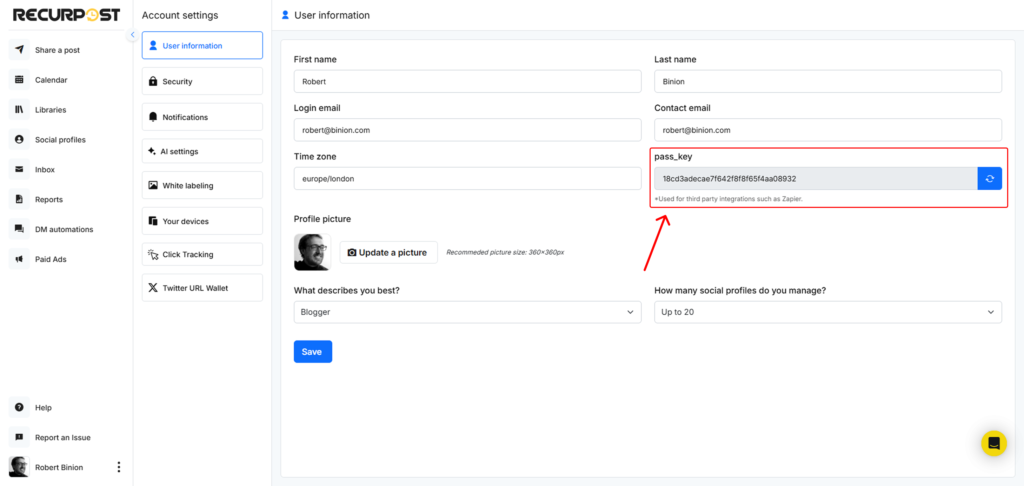
Copy the key from this page and paste it into Zapier along with your email address to verify your RecurPost account.
Your passkey is separate from your RecurPost login password, and you can regenerate it at any time without changing that password.
RecurPost Triggers in Zapier
A trigger is the first step in a Zap. RecurPost has one trigger: New Update Posted. It fires whenever RecurPost publishes an update to a social account you choose.
When you set it up, specify which social profile should fire the trigger. You can set up separate Zaps for different profiles if you want to handle them differently.
Use it whenever you want a record of, or a follow-up action on, everything RecurPost publishes. For example:
- Write a row to a Google Sheet for every published post, to track how many posts went out for a client.
- Save each published link to a bookmarking app such as Raindrop.io, building a swipe file your team can reuse.
- Send a Slack message to the account channel whenever an update goes live.
Because Zapier connects thousands of apps, this trigger can feed almost any tool your team already uses.
RecurPost actions in Zapier
An action is what a Zap does once a trigger fires. In the examples above, writing the Google Sheets row and saving the bookmark are actions, and they belong to Google and Raindrop.io, not to RecurPost.
RecurPost gives you two actions of its own:
- Add an Update to a Library — adds new content to a RecurPost library of your choice. For example, every time you save a URL in Raindrop.io, it can land in a library automatically, waiting for you to schedule it.
- Post a One-Off Update — schedules a post through RecurPost. For example, every time you publish a new blog post on your WordPress site, it can go out on your connected accounts.
To set up either action, supply the message and — where you need them — the image URL, the video URL, and the link to go with it.
RecurPost checks whether the update is allowed on your current plan. If everything is fine, the action runs as expected. If there is an error, Zapier emails you to say the Zap did not run properly.