

Twitter’s guidelines prohibit the sharing of duplicate content on the same profile. According to Twitter, duplicate content can be a block of text, an image, or a combination of content that has been copied and pasted or repeated in any way across the platform.
While duplicate material is a strategy for spreading a message and is utilized for a variety of purposes, it can be constant, spammy, and disruptive to people’s Twitter experiences. Duplicate content can also be used to artificially magnify content, suppress information, or manipulate Twitter’s Trends, Top Search results, and platform-wide conversations.
RecurPost’s limitations on sharing duplicate content on Twitter
Twitter announced new rules in February 2018 to stop users from improperly using several Twitter accounts to unnaturally spread a message. In other words, you can no longer duplicate content on your Twitter accounts.
As a result, third-party services like RecurPost are not allowed to let users share the same post on Twitter more than once.
We have also made certain adjustments to RecurPost in order to guarantee that your account is completely safe and conforms to all Twitter policies. This means it’s no longer possible to share duplicate content on Twitter from RecurPost.
Adding Variations to Your Tweets From RecurPost
RecurPost enables you to add variations to your tweets in order to comply with Twitter’s policy, which we mentioned in this post, because Twitter does not permit the sharing of the same or identical information.
For instance, by simply altering the text that goes with your post, you can still reuse the same link, image, or video. These extra messages are referred to as “variations”. Once each variation has been shared on Twitter, you can either edit an old variation or add a new one. You can add as many variations as you want to a post.
How to add Variations for different post types
RecurPost will let you add variations for each Tweet, whether it is a link post, text post, or a media post (image & video).
As long as there is one variation that has not already been tweeted, your Tweets will go out as usual. Once we have posted every variation, you will need to add more variations for your Tweets to go out as per your schedule.
You can add multiple variations to the message accompanying your post. You can always see how many variations you’ve added and how many of them are still good to go on Twitter.
Just by adding variations to your tweet (post), you can repost your tweets. For instance, if you add 10 variations to a tweet then your tweet will be published 11 times. (1 main tweet + 10 variations)
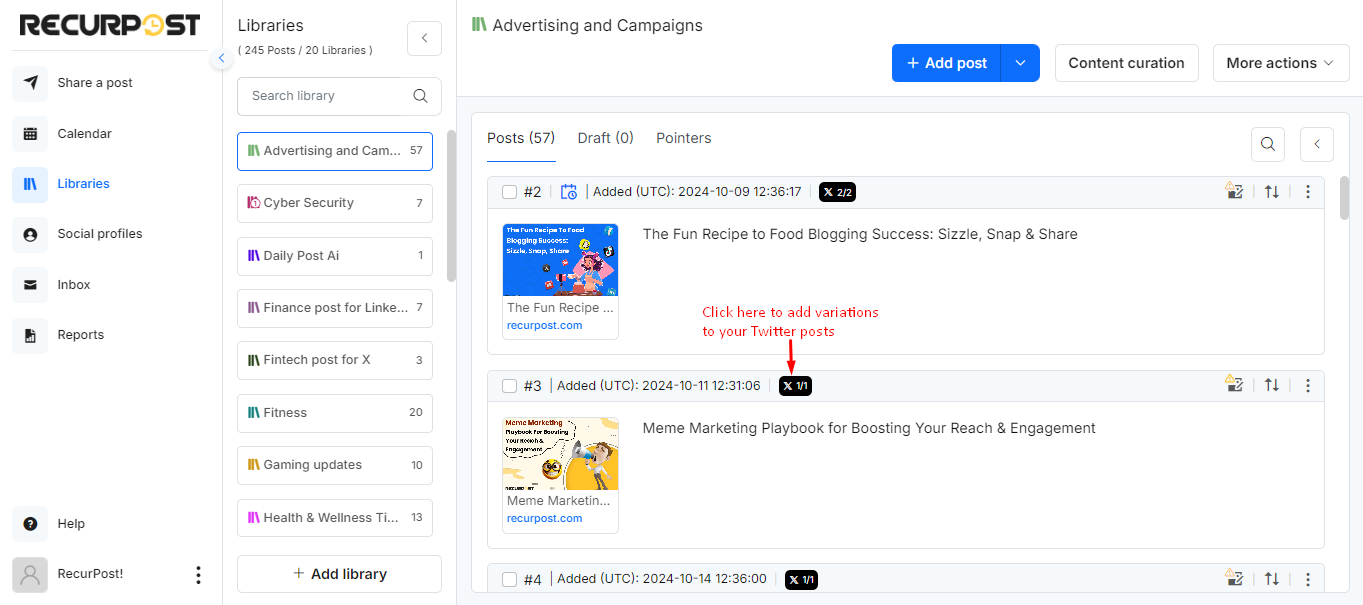
Variations could be just a minor change in your original tweet.
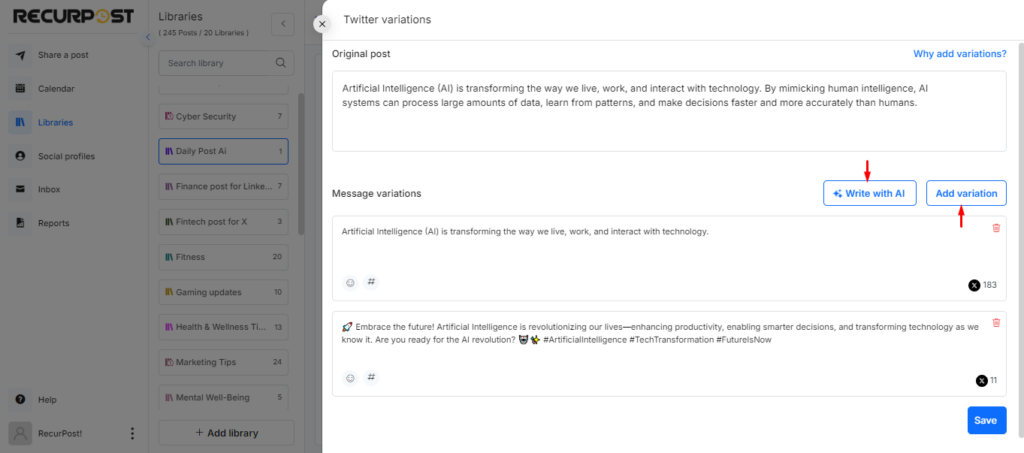
- For Text Post – You will have to add variations manually. You will have to change/edit your content while adding the variations. Even adding or removing a hashtag from the post will do the trick.
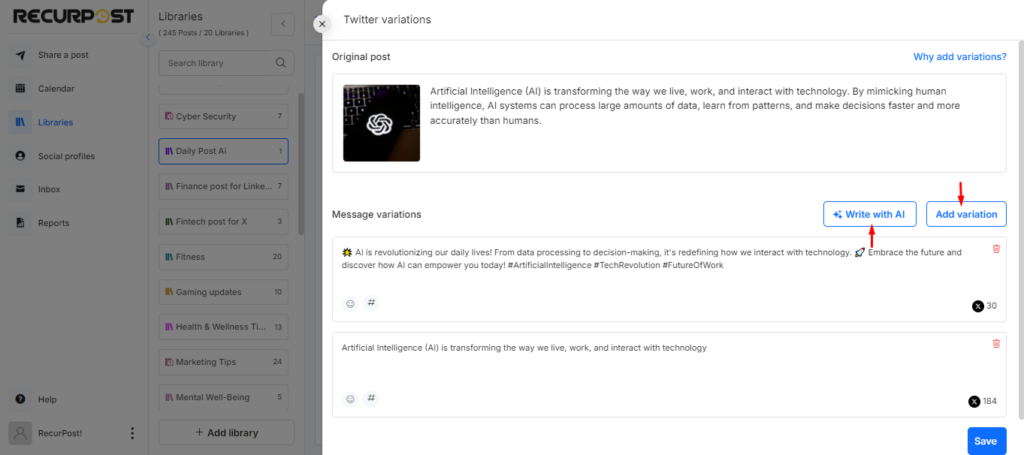
- For Image & Video Posts – You can simply change the text/caption while adding the variations in the post. Your image or video can stay the same and you will be able to add multiple variations to your message. You will have to add these variations manually.
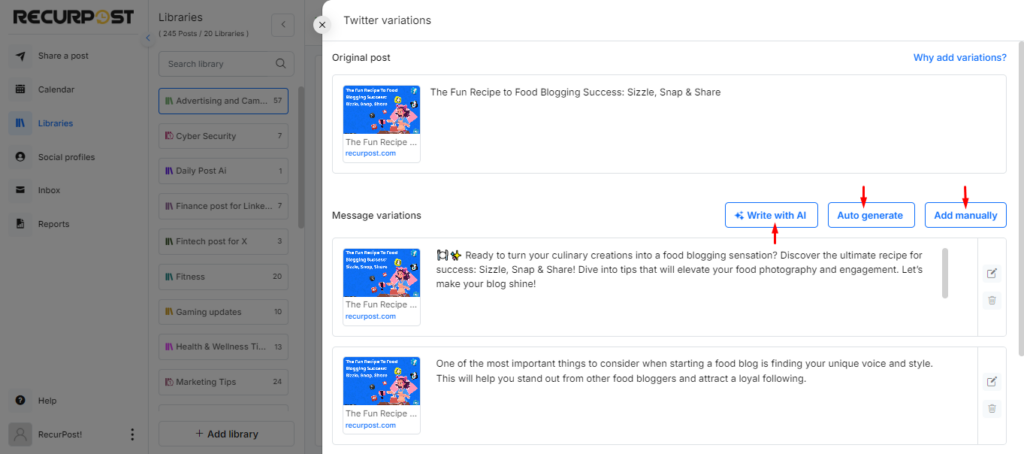
- For Link Post – You can get a helping hand in this case as you can add variations to the post either manually or auto-generate 5 variations at a time in one go. You can use the “Auto-Generate” button while adding variations and RecurPost will take care of it. You can edit the variations auto-generated by us or use them without any changes.
Please Note:
- You can add/create a set number of variations to a post. These variations will not include the post count (Stored Recurring Updates) that you get on your plan. For instance, if you have a Personal Plan and can add 500 Stored Recurring Updates to your library, the Twitter variations will not be counted as part of the post count that you get on your plan.
- You can only create/add Twitter variations if you have a schedule created for Twitter in that particular library.
- Variations can only be created and shared on Twitter from RecurPost, as the other social media platforms allow you to share similar content.
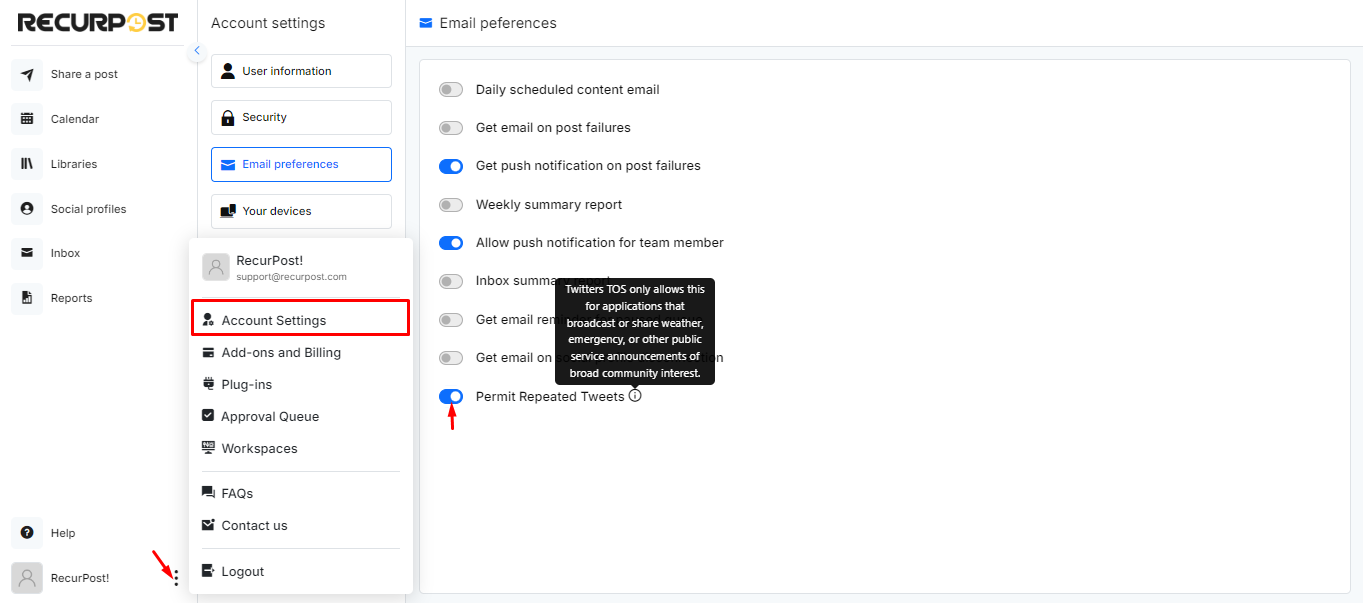
Permit Repeated Tweets
RecurPost now has a feature that enables its users to repost content that is of the nature of broad public interests such as weather, emergency or other public service announcements. Please note that we advise our users to exercise caution when using this feature to share content that does not fall under the category of broad public interests, as reposting such content can result in their Twitter account getting flagged.
You can learn more about Twitter’s policy on duplicate content by clicking here.
We hope this information was helpful to you. If you have any questions or need help while adding Twitter Variations, then please reach out to us at support@recurpost.com.
Video tutorial: Twitter variation rules
As we mentioned in our previous post, Twitter has announced changes in its policy that define how an automation tool can interact with Twitter.
These changes affect social media scheduling tools like RecurPost, and hence, to comply with their rules, we have made some changes to RecurPost.
In this post, we are going to share more details about them. While we had to change our social media scheduling algorithms for Twitter, the spirit has not changed.
You can still share your content on Twitter from RecurPost. However, you cannot continue to post the same content on the platform multiple times.
We have, however, found a way for you to quickly add content for Twitter in one go and not have to worry about it every day.
You can now add multiple variations to the message that goes along with your post.
For instance, you can still recycle the same link, image, or video by simply changing the text that accompanies your post.
We call these additional messages “variations”. Each variation can be posted on Twitter once, and after that, you can either edit an old variation or add a new one. You can add as many variations as you want to a post.
You will always see how many variations you added and how many of them are still good to go on Twitter.
Please note that we will not use these variations for any social platform other than Twitter. Your Facebook, LinkedIn, Google, My Business, Instagram and Pinterest posts will continue to go out like they always do.
The best part of this feature is that you don’t need to write your variations manually. You can use our automatic variation generator AI tool to write these variations quickly if you have a link post.
We don’t merely rewrite your Tweet. We find Tweets hidden in your content and then make suggestions. You can edit the suggestions or use them without any changes.
Video Overview: Adapting to Twitter’s Updated Policy with RecurPost
These changes make sure that your account complies with Twitter guidelines 100%. You have nothing to worry about when you use RecurPost.
If you have a question about this, please feel free to contact us.